Blue - Green Deployment
Proficient in Devops ,cloud and SDLC including analysis, design, coding, scripting ,testing, automation ,version control, documentation, support.
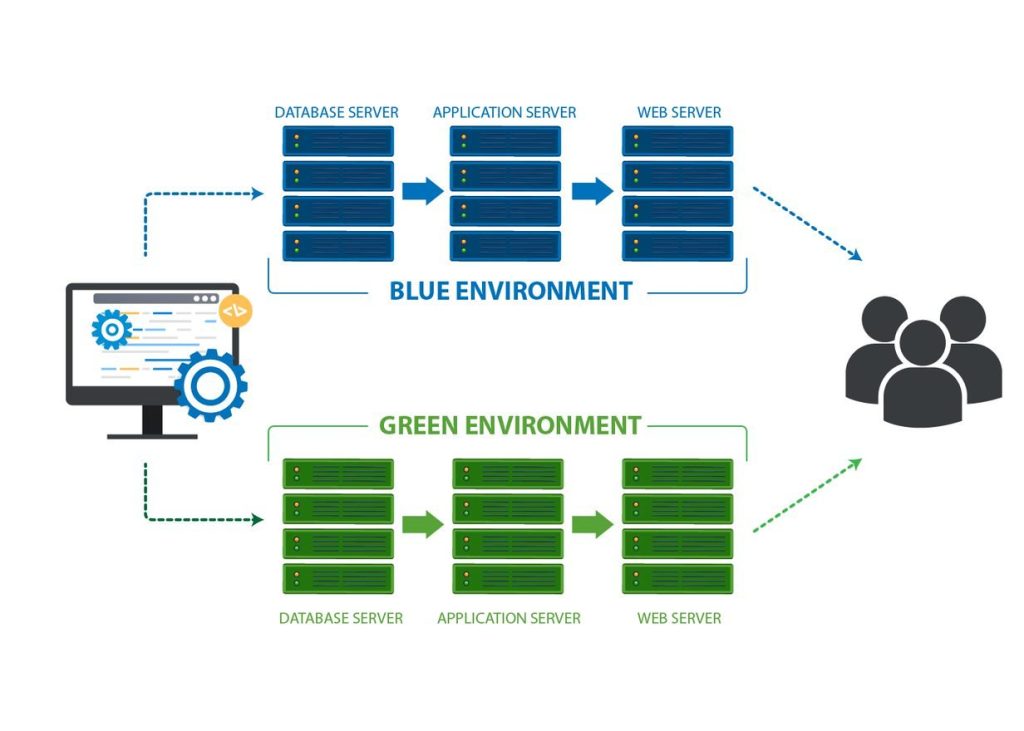
Blue-green deployment is a software release strategy that minimizes downtime and risks during the deployment process. It involves running two identical environments, referred to as "blue" and "green," and switching traffic between them when deploying new versions of an application. This approach ensures that users can access the application at all times and allows for quick rollback in case of issues. Let's delve into the details and provide examples of how blue-green deployment works.
Setting up the Blue Environment:
The blue environment represents the currently running version of the application that is serving production traffic.
It is a stable and tested environment where users can access the application without disruptions.
Initially, all user traffic is directed to the blue environment.
Preparing the Green Environment:
The green environment is a duplicate of the blue environment but with the updated version of the application.
It's essential to ensure that the green environment is thoroughly tested and functioning correctly before performing the switch.
The green environment should be isolated from user traffic during the deployment process.
Verifying the Green Environment:
Once the green environment is set up, you need to conduct extensive testing to ensure the new version works as expected.
This includes functional testing, performance testing, and any other relevant testing procedures.
Automated tests are particularly useful for quickly validating the new version in the green environment.
Switching Traffic:
Once the green environment is verified, traffic routing is switched from the blue to the green environment.
This can be done using various methods such as updating DNS records, load balancer configuration changes, or routing rules adjustments.
Traffic is gradually shifted to the green environment, allowing for monitoring and identification of any issues that may arise.
Monitoring and Rollback:
After the traffic switch, closely monitor the green environment to ensure it handles the load and performs as expected.
If any critical issues are detected, you can quickly rollback by redirecting traffic back to the blue environment.
The blue environment serves as a stable fallback option that ensures minimal disruption to users.
Decommissioning the Blue Environment:
Once you are confident in the stability and performance of the green environment, you can decommission the blue environment.
However, it is recommended to keep the blue environment active for a certain period to allow for easy rollback if necessary.
Example Scenario: Let's consider a web application running on a cluster of servers. The current production version is v1.0 (blue), and you are deploying an updated version v2.0 (green) using the blue-green deployment strategy.
Set up the Blue Environment:
- Users access the application through the load balancer, which routes traffic to the blue environment running v1.0.
Prepare the Green Environment:
Create an identical environment as the blue environment, but with the updated v2.0 version of the application.
Ensure all dependencies and configurations are in place for the green environment.
Verify the Green Environment:
Run extensive automated and manual tests on the green environment to ensure the new version functions correctly.
This includes testing for functionality, performance, and compatibility.
Switch Traffic:
Update the load balancer configuration to gradually shift traffic from the blue to the green environment.
Initially, a small percentage of users are redirected to the green environment, while the majority still access the blue environment.
Monitor and Rollback:
Monitor the green environment's performance, logs, and user feedback to identify any issues.
If critical issues arise, roll back by switching traffic back to the blue environment.
Decommission the Blue Environment:
- Once the green environment is stable and performs well.
Advantages of Blue-Green Deployment:
Minimal Downtime: Blue-green deployment ensures minimal downtime during the deployment process. Users can access the application without interruptions because the blue environment remains active until the green environment is fully tested and verified.
Quick Rollback: If any issues or errors are detected in the green environment, you can easily switch traffic back to the blue environment, providing a quick rollback mechanism. This minimizes the impact on users and allows you to address the issues without affecting production.
Increased Reliability: By running two identical environments, blue-green deployment provides redundancy and increased reliability. If the green environment encounters problems, you can simply route traffic back to the blue environment, which is a known stable state.
Simplified Testing: The green environment serves as a dedicated testing environment for the new version. It allows thorough testing without affecting the production environment or users' experience. This isolation enables comprehensive testing of the new version's functionality, performance, and compatibility.
Continuous Delivery and Continuous Integration: Blue-green deployment aligns well with continuous delivery and continuous integration practices. It enables the seamless rollout of new versions while maintaining a high level of automation and testing.
Considerations for Blue-Green Deployment:
Infrastructure Cost: Running two identical environments concurrently can require additional infrastructure resources, such as servers, load balancers, and databases. Consider the cost implications when implementing blue-green deployment.
Data Synchronization: If your application relies on databases or other data storage systems, ensure proper synchronization between the blue and green environments during the deployment process. This is necessary to avoid inconsistencies and data loss.
Session Persistence: If your application uses session-based authentication or stores user-specific data, ensure session persistence across the blue and green environments. This allows users to maintain their session state during the traffic switch.
Database Schema Updates: If your deployment involves database schema updates, ensure proper handling of database migrations. Use tools and techniques to migrate data and schema changes seamlessly between the blue and green environments.
Configuration Management: Manage configurations carefully to ensure consistency between the blue and green environments. Automate configuration updates during the deployment process to prevent inconsistencies and errors.
Example Scenario (Continued): 6. Decommission the Blue Environment:
Once the green environment is stable and performs well, and you are confident in the new version's reliability, you can decommission the blue environment.
At this point, all user traffic is directed to the green environment running v2.0.
The blue environment can be repurposed for future deployments or temporarily kept as a fallback option before eventually decommissioning it.
Blue-green deployment is a powerful strategy for reducing downtime, minimizing risks, and maintaining application availability during the deployment process. It allows for seamless updates, easy rollback, and increased confidence in software releases.
Conclusion:
In conclusion, blue-green deployment is a deployment strategy that helps minimize downtime and risks during the release of software applications. By maintaining two identical environments, blue and green, it ensures that users can access the application without interruptions while allowing for quick rollback in case of issues. The benefits of blue-green deployment include minimal downtime, easy rollback, increased reliability, simplified testing, and alignment with continuous delivery practices.
However, implementing blue-green deployment requires careful consideration of factors such as infrastructure cost, data synchronization, session persistence, database schema updates, and configuration management. These considerations ensure a smooth transition between the blue and green environments, preventing data inconsistencies and maintaining the integrity of the application.
Blue-green deployment enables organizations to release new versions of their applications seamlessly while maintaining high availability and minimizing the impact on end users. By following this strategy, companies can deliver software updates with confidence, reduce risks, and provide a superior experience to their users.


